
Using hospitals
Hospital hours, weekend and holiday clinics in China
Verify the exact hospital, campus, clinic session, check-in cutoff, supporting-service hours and latest weekend or holiday notice before travel.
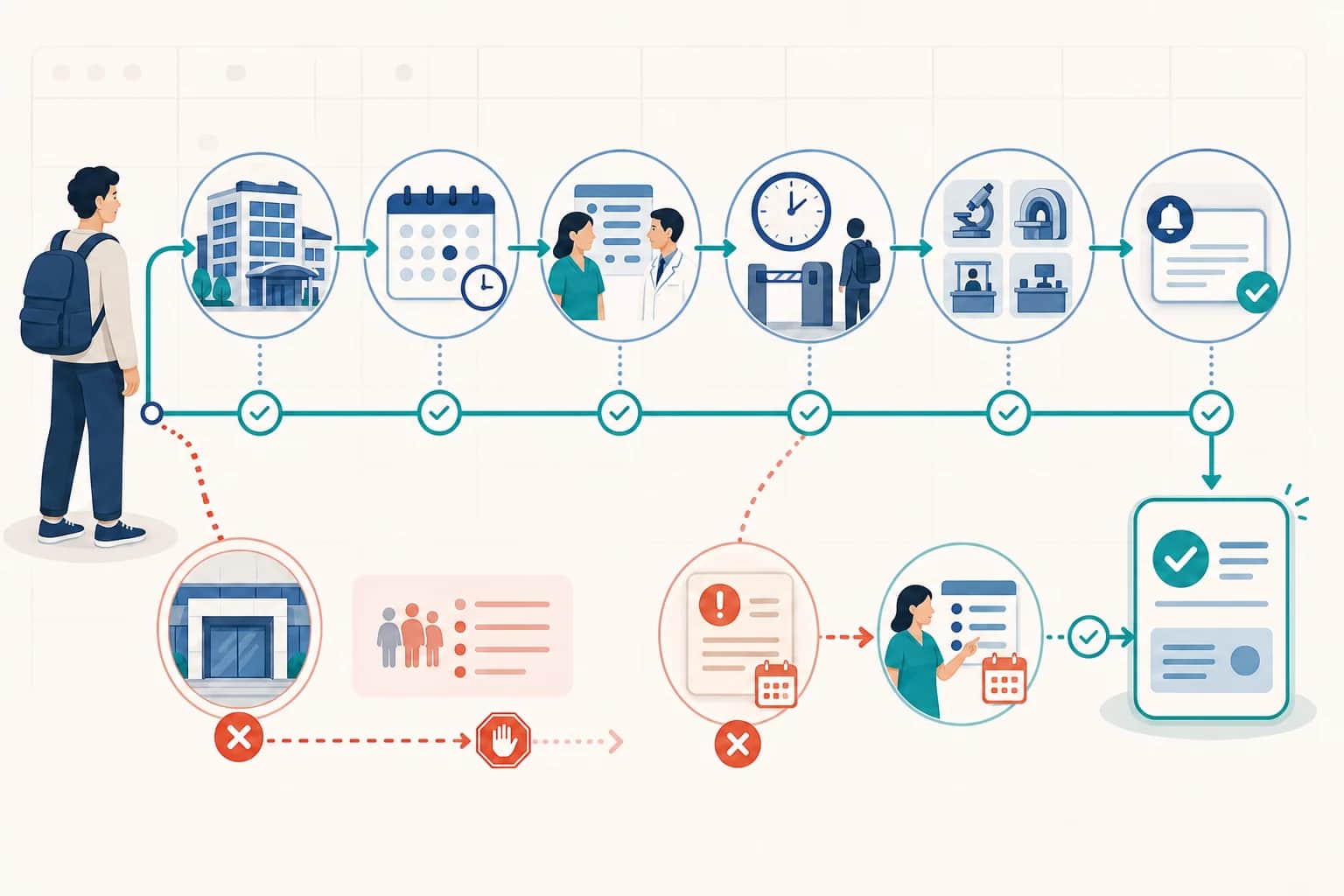
Hospital hours in China are not one number. A hospital building may be accessible while a particular outpatient department, clinician session, registration route, laboratory, imaging service, pharmacy, cashier, records desk, insurance counter or international-patient desk is closed or working to a different timetable. Weekend, evening and public-holiday arrangements are especially specific to the institution, campus, service and date. This guide gives international patients an administrative verification route for a planned visit: identify the exact provider and campus, read the live schedule, distinguish booking from check-in, apply the newest dated notice, verify every supporting service and save an updated confirmation. It does not decide whether it is clinically safe to wait, recommend a provider or turn a building-hours label into a promise about medical availability. For immediate danger, call 120 or use an appropriate emergency route; do not use an outpatient schedule page to make that decision.
Use this as a practical starting point
Provider procedures can change, so confirm time-sensitive details with the hospital, insurer or service. A licensed professional must make clinical decisions for an individual patient.
At a glance
Key points
- There is no nationwide standard timetable that replaces the current information of the exact provider, campus, service and date.
- A building marked open, including a location described as open continuously, does not prove that every ordinary outpatient department or support desk is available.
- Treat the department or clinician session, appointment inventory, registration cutoff and on-site check-in as separate operational records.
- A holiday, weekend, temporary-suspension or replacement-session notice overrides the routine schedule only for the services and dates it names.
- Confirm laboratory, imaging, pharmacy, cashier, records, insurance and international-patient services separately when the visit depends on them.
- A waitlist or pending request is not a confirmed appointment; keep the newest provider-issued status and booking details.
- One campus or branch in a hospital network does not establish the hours, services or booking route of another location.
- Outpatient hours do not establish emergency availability, clinical urgency, language coverage, insurance acceptance or suitability for an individual patient.
1. Use this route only for planned schedule verification
Start by defining the task. This page is for a planned outpatient visit, a scheduled test, a records collection, a pharmacy pickup, an insurance-counter visit or another operational question where it is already appropriate to check the provider's timetable. Write down what must actually happen, not simply the name of a large hospital. A consultation, blood draw, imaging appointment, medicine pickup and document collection can involve different systems, locations and closing points even when they are all associated with one institution.
Do not use the next outpatient session as a clinical waiting rule. A timetable cannot tell you whether a symptom is urgent, whether a person can safely travel, which department is medically suitable or whether emergency care is required. If there is immediate danger, call 120 or use an appropriate emergency department. If the situation is not an immediate emergency but you are unsure whether it can wait, ask the responsible healthcare provider rather than calculating from the next clinic opening.
The national information-disclosure catalogue treats outpatient, emergency and holiday service times as information that medical institutions publish, while the national appointment framework describes appointment and patient-service functions. Those sources explain why the responsible provider is the operational source. They do not create a single national schedule. A familiar routine from another city, another hospital or an earlier visit is therefore only a lead to verify, never the final answer.
Keep the scope narrow while checking. Record the exact task, requested date, expected service and the provider-controlled channel you will use. This prevents a general statement such as “the hospital is open” from silently becoming a claim that the correct clinician, registration channel and supporting services will all be available. The goal is a matched visit record, not confidence based on a building icon or search snippet.
- Planned outpatient consultation or provider-arranged follow-up
- Scheduled laboratory, imaging or examination task
- Pharmacy, cashier, records, insurance or international-patient desk task
- Exact date and service that need operational confirmation
This workflow verifies operational access. It does not choose a department, assess urgency or decide whether waiting is clinically safe.
2. Match the legal provider, exact campus and service route
Copy the full provider name and campus or clinic name from the appointment record, provider directory or location page. Hospital networks may have a main hospital, several campuses, community sites, specialty clinics and a distinct international medical route. They can share a brand while using different addresses, entrances, departments, booking systems and hours. A map result for the network name is not enough to identify where the booked service will be delivered.
Use the provider's own location or campus directory to match four fields: institution, campus or clinic, street address and named service. Jiahui Health's English location pages, for example, identify Jing'an Clinic and Jiahui International Hospital as separate locations with their own location-level information. These pages illustrate the matching method only. They do not make the services or hours of one location portable to the other, and they do not show that every service is available for every minute the building is described as open.
Pay attention to routes nested inside one provider. An international medical department, general outpatient department, health-management centre and emergency department may publish separate information even at the same campus. Preserve the route name shown in the booking. If the route is unclear, ask the provider to state the exact campus, building, department or clinic and registration point in one response rather than answering only with the institution's name.
Before travelling, compare the address in the newest confirmation with the address in the provider's current location page. If they conflict, pause and resolve the mismatch through a current provider-controlled contact. Do not choose the more convenient address, assume the older record is correct or infer that staff at one branch can complete a task assigned to another. Save the corrected location together with the appointment so the schedule and destination remain linked.
- Full institution or provider-network name
- Exact campus, branch, clinic or international route
- Current street address and stated entrance
- Named department, clinician session or supporting service
3. Separate the six operational clocks behind one visit
Do not compress the visit into “opening hours.” Check at least six clocks: the building or entrance, the department or clinician session, the window in which appointment inventory can be booked, any registration or payment deadline, the on-site check-in or reporting cutoff and each supporting service needed before or after the consultation. A provider may operate a weekend session while its appointment line, cashier, records counter or another department follows a different schedule.
PUMCH International Medical Services publishes an appointment-and-hours route that separates several service periods and a separate schedule-query page for current clinic sessions. A dated PUMCH weekend physical-examination notice also pairs one named service with its own arrangement route. These are useful structural examples: a service session and the channel used to arrange it are related but not identical. Their published details apply only to the stated PUMCH route and must be rechecked there.
Read appointment language precisely. The date shown beside a clinician can be the session date, while an appointment platform can impose a separate release time, reservation closing point or status-update process. A confirmation can also instruct the patient to arrive or report before the displayed consultation time. Do not replace those provider instructions with a general rule such as arriving a fixed number of minutes early; preserve the exact wording and ask the provider if a cutoff is unclear.
Make one small schedule table for yourself. Use separate rows for campus access, department or clinician, registration, check-in, laboratory, imaging, pharmacy, cashier, records, insurance and language or international-patient support. Record “not required” only when the visit truly does not depend on that service. Record “not confirmed” when the provider has not answered. This prevents a blank field from being mistaken for an open service.
- Building or entrance access
- Department or clinician session
- Booking-channel availability and appointment inventory
- Registration, payment or document-submission deadline
- On-site reporting or check-in cutoff
- Laboratory, imaging, pharmacy, cashier and records services
4. Apply weekend, holiday and temporary notices as dated overrides
Treat the routine schedule as the baseline and the newest applicable dated notice as an override. Open the provider's notice archive and look for the requested calendar date, public holiday, weekend service, temporary suspension, campus change or replacement session. The notice must match the same institution, route and service. A notice for the general outpatient department may not govern an international medical department, health-management centre, community clinic or supporting service unless it says so.
PUMCH International Medical Services maintains a current notice archive and issued a dated 2026 Labour Day arrangement that separates a stated closure, outpatient arrangements on other dates and an emergency route. The University of Hong Kong-Shenzhen Hospital's 2026 New Year notice separately describes several outpatient, emergency, international, obstetric, health-management, physical-examination and community services. These examples show that a holiday label alone is too broad; the controlling fields are provider, service and date.
Use publication order carefully. A newer notice can correct an earlier notice, but a newer unrelated article does not automatically replace a service-specific arrangement. Compare the title, publication date, applicable date range, campus, department or route and any stated booking instruction. If two current-looking provider pages conflict, do not silently choose one. Capture both URLs or screenshots and ask the provider which record governs the exact appointment.
Recheck after booking and again before travel because an appointment created under the routine schedule can be affected by a later suspension or holiday adjustment. If the provider changes the session, save the cancellation, replacement or rescheduling message and obtain a new confirmation. An old appointment screenshot remains evidence of the earlier transaction; it is not proof that the original session still exists after a dated change notice.
A holiday notice overrides the routine schedule only for the provider, route, service and dates it actually names. Never turn one dated example into a permanent national timetable.
5. Build a source chain instead of trusting a search result
Use a four-link source chain: the provider's location or department directory identifies the responsible campus and route; the current schedule shows the requested service or clinician session; the appointment system or provider-issued confirmation records the individual booking state; and the newest dated notice shows whether a holiday, suspension or temporary arrangement modifies it. Each link answers a different question. None should be expanded beyond its own scope.
Search results, map panels, social reposts and saved messages can help you find a provider-controlled page, but they are not the final schedule. A search snippet may display text that has since changed, omit the campus, show a location-level label or rank an old holiday notice above the current one. Open the result, inspect the provider identity and date and then move to the provider's live schedule, notice archive or contact route. Keep the final URL rather than the search query.
A provider's English page can make the route easier to understand, but the live Chinese schedule or newest Chinese notice may contain the current operational detail. Compare identifiers rather than assuming translated pages update simultaneously. Match the provider name, campus, date, department and booking reference. If a machine translation changes a time, route name or status, preserve the original text and ask the provider to confirm the field instead of editing it yourself.
Use a current provider-controlled contact only to resolve a remaining operational gap. Jiahui Health's English contact route is one provider-specific example; it does not establish another hospital's process. Ask a closed question containing the exact date, campus, service and task, then save the provider's answer with the schedule record. A phone conversation can guide the next step, but request a written or in-app confirmation when the provider's process offers one.
- Provider location or department directory
- Live service or clinician schedule
- Individual booking or updated confirmation
- Newest applicable holiday or suspension notice
- Provider-controlled contact used only to resolve a mismatch
6. Distinguish appointment inventory, waitlist status, registration and check-in
An appointment search result can show a department without showing a bookable slot. A submitted request can remain pending. A waitlist application can remain unconfirmed. A confirmed appointment can still require registration, identity matching, payment or on-site check-in. Treat these as separate states and look for the status the provider actually issues. Do not travel on the assumption that submitting a form or joining a waitlist created an appointment.
PUMCH International Medical Services' 2026 registration guide describes several booking channels, passport-based registration and a waitlist process in which the application is not confirmed until the stated status changes. This is a provider-specific example of why “request sent,” “waitlist,” “appointment confirmed” and “checked in” are not synonyms. The exact labels and steps of another provider can differ, so read that provider's own current instructions.
Match the patient identity used in the booking to the identity accepted for registration. For an international patient, the passport spelling, passport number, nationality field, mobile number and patient-account record can affect whether staff can find the appointment. If the passport has changed or the app account uses a different document, ask the provider how to update the patient record before the scheduled date. Do not create duplicate accounts as a shortcut unless the provider instructs you to do so.
Keep the appointment status together with the provider, campus, department or clinician, date, session, patient name, accepted identity document and any reporting instruction. On the day, complete the provider's stated check-in or registration step and retain the resulting record when available. A booking confirmation proves the appointment state at the time it was issued; it does not prove that on-site check-in has already been completed.
Waitlist or pending status is not a confirmed slot. Confirmed booking is not the same as completed registration or on-site check-in.
7. Verify every supporting service on which the visit depends
A consultation schedule is only one part of the visit. If the provider instructed you to complete laboratory work, imaging, a physical examination, payment, document collection or medicine pickup on the same day, verify that service separately. Record its exact campus, department or counter, whether an appointment or order is required, its registration or reporting cutoff and any collection window. Do not assume the consultation timetable carries through to the rest of the building.
PUMCH's appointment-and-hours route separates several operational categories, while its weekend physical-examination notice concerns one named service and a separate arrangement route. The Hong Kong University-Shenzhen Hospital holiday notice divides multiple outpatient and support-related services instead of giving one hospital-wide answer. Together these provider examples show why a weekend clinic can operate without proving that every laboratory, imaging room, pharmacy window, cashier or records desk follows the same session.
Separate services before and after the consultation. A test performed earlier may have a different reporting point from the clinic; a pharmacy pickup can depend on a completed prescription and payment record; an insurance or cashier step can depend on the hospital's internal settlement workflow; a records request can operate through another office. This guide does not decide what tests, medicines or services a person needs. It only helps verify the operational route for tasks already stated by the responsible provider.
If a supporting service cannot be confirmed, ask whether the provider can complete it on the same campus and date, whether it requires a separate appointment and what current route issues the confirmation. Do not infer that another branch can accept the order. If the service is moved to another day or location, update the travel plan and retain both records so the consultation and supporting-service schedule do not become mixed.
- Laboratory collection and report route
- Imaging registration, examination and image or report collection
- Pharmacy dispensing or pickup counter
- Cashier, invoice and payment-record service
- Medical-records or document-copy office
- Insurance, direct-billing or international-patient desk
8. Confirm passport access, language help and contact routes separately
A visible clinic session does not prove that the booking channel accepts the patient's document or account. Check how the provider registers an international patient, which identity document it accepts, whether the passport must be added before booking and whether the appointment channel can find an existing patient record. Keep the spelling and document number consistent. If the channel blocks the passport or foreign mobile number, use the provider's current assistance route instead of entering false local identity details.
PUMCH International Medical Services' registration guide gives a provider-specific passport and booking example. It does not establish a nationwide rule or the workflow of another hospital. A private provider's English contact page can also offer an accessible route, but an English webpage or contact line does not prove that a particular clinician, department, cashier, laboratory or after-hours shift offers English-language support. Language availability must be confirmed for the exact date, campus and task.
Separate booking-language help, on-site navigation, spoken clinical interpretation and written translation. They can be provided by different people or services and can follow different hours. Ask what kind of help is available, how it is arranged and whether it must be booked. Do not send medical records or passport images to an account merely because it answered in English; first confirm that the channel belongs to the provider and follow the provider's stated secure route.
When contacting the provider, keep the question operational: identify the institution, campus, date, department or service, appointment status and language task. Do not ask an administrative agent to decide clinical urgency or suitability. Save the confirmed route, and if the answer is verbal, write down when and how it was received. Recheck any detail that conflicts with the provider's written schedule or booking record.
9. Resolve conflicting schedules, cancellations and replacement sessions
A conflict can be simple: an old appointment shows one campus while a newer notice shows another, the live schedule no longer lists the clinician, a holiday notice changes the date, or a contact agent gives a different cutoff from the app. Do not hide the mismatch by copying only the detail you prefer. Preserve each record with its date and source, then ask the provider which one governs the exact booking. The provider may need to cancel, move or reissue the appointment.
Use the official cancellation or rescheduling route linked to the appointment or stated by the provider. Avoid cancelling through a search result, unofficial agent or unrelated campus. Confirm what happens to the original booking, whether a replacement has actually been created and whether any registration, payment, deposit or authorization record must be updated. This guide does not state a universal cancellation deadline or refund rule; those are provider- and transaction-specific.
When a new session is offered, repeat the campus, service, date, appointment-status, check-in and support-service checks. A replacement date can fall under a different holiday notice or use another clinician, department route or location. Do not treat “we can move it” as a finished booking. Keep the new confirmation and label the old record cancelled, superseded or unresolved so that companions and insurers do not act on the wrong version.
Provider notice archives and holiday arrangements are useful for checking changes, while a current provider contact route is useful for resolving an individual conflict. Neither should be used beyond its scope. A notice may apply to a service but not contain the patient's booking state; a contact response may answer one case but not create a public timetable. The final evidence should connect the general service arrangement to the individual updated confirmation.
10. Keep outpatient, extended-hours and emergency routes separate
Labels such as evening clinic, weekend clinic, holiday outpatient service, extended hours, emergency department and continuous building access describe different things. An evening or weekend session is still a provider-defined service with its own department, date, appointment and check-in conditions. An emergency route is not proof that ordinary outpatient departments operate continuously. A location described as open continuously does not prove that every clinician, laboratory, pharmacy or administrative desk is available at all times.
Provider holiday notices can explicitly separate outpatient closures or sessions from emergency arrangements, as the cited PUMCH and Hong Kong University-Shenzhen Hospital examples do. Read each service line separately. Do not infer that an emergency department provides a scheduled specialist appointment, routine test, prescription refill, medical-record copy, insurance desk or international-patient service simply because the hospital has an emergency route.
This page intentionally does not tell a reader whether to wait for an evening, weekend or holiday clinic. It does not assess symptoms, diagnose a condition or compare providers. If there is immediate danger, call 120 or use an appropriate emergency department. For a non-emergency operational question, use the provider's current contact route. For uncertainty about whether waiting is safe, ask a qualified healthcare provider rather than relying on published hours.
Keep the evidence labels honest. A schedule can prove only that a provider published a session. A confirmation can prove only the recorded booking state. A location page can prove only the stated location-level information. None proves clinical suitability, emergency capacity, language support, insurance acceptance, a particular clinician's availability after a later change or an outcome. Maintaining those boundaries makes the schedule guide useful without turning administrative evidence into medical advice.
For immediate danger, call 120. This guide verifies planned operational access and never decides whether a person should wait for outpatient care.
11. Complete a final date-specific evidence pack
Finish with one record that another person can understand without repeating the search. Put the exact provider, campus, address, department or clinician, service date, session, patient identity, appointment status, reporting or check-in instruction and required supporting services at the top. Add the current schedule URL, newest applicable notice, provider contact used and the time of the last check. Attach the newest booking confirmation and keep any cancellation or replacement message.
Run a same-date logic check. The provider and campus on the schedule must match the confirmation. The date and session must remain present in the live route or be supported by the provider's response. The newest applicable holiday or suspension notice must not cancel or move it. The registration and check-in steps must be actionable for the patient's accepted identity. Every required laboratory, imaging, pharmacy, cashier, records, insurance or language service must have its own confirmed route or be marked unresolved.
Run a source-quality check. Prefer the provider's own schedule, notice archive, appointment status and contact route. A map panel, search snippet or repost can remain as discovery evidence but should not control the plan. Preserve original-language screenshots or files when translation is used. Note exactly what each source supports, and do not turn a location page into a department schedule or a dated notice into a permanent rule.
Recheck close enough to travel that a later provider notice or cancellation can be caught, but do not promise that any check prevents change. If the provider issues an update, replace the operational plan and keep the earlier record as superseded. The completed pack should answer where, when, what service, what status, what check-in step, what support services and which current provider source controls each answer.
- Provider, campus, address and route all match
- Department, clinician or named service matches
- Date, session and appointment status are current
- Registration and check-in instructions are separate and saved
- Newest holiday, weekend or suspension notice has been applied
- Every required support service has its own route
- Provider contact and last-check time are recorded
- Old records are marked superseded rather than deleted
Useful language
Navigation phrases
Show the Chinese characters when pronunciation is uncertain. Use the copy button to send one phrase through a trusted channel without retyping it.
Avoidable problems
Common mistakes
- Treating a building's opening label as the timetable for every outpatient department
- Assuming a location described as open continuously provides every ordinary outpatient service continuously
- Using another campus or branch in the same network as evidence for the booked location
- Reading a clinician session without checking remaining appointment inventory
- Treating a submitted request, pending status or waitlist as a confirmed appointment
- Treating booking confirmation as proof that registration or on-site check-in is complete
- Assuming the consultation time is also the registration or reporting cutoff
- Using a search snippet, map panel or repost as the controlling schedule
- Using an old holiday notice as a permanent timetable
- Missing a newer suspension, replacement-session or campus-change notice
- Assuming a weekend clinic includes every laboratory, imaging, pharmacy and cashier service
- Assuming an English webpage proves that the requested shift has language support
- Entering false local identity information when a foreign-passport workflow fails
- Cancelling or rescheduling through an unofficial agent or unrelated campus
- Saving a verbal answer without the date, route or person who provided it
- Treating emergency access as proof that ordinary outpatient departments are open
- Using the next clinic session to decide whether it is clinically safe to wait
- Deleting the old booking instead of retaining it as superseded evidence
Common questions
Frequently asked questions
Are Chinese hospital outpatient hours standardized nationwide?
No. National frameworks address provider information disclosure and appointment services, but they do not create one timetable for every hospital. Verify the responsible institution, exact campus, department or service, date, live schedule, appointment state and newest applicable notice. A routine seen in another city or on an earlier visit is not current evidence for this appointment.
If the hospital building is open, is the outpatient department open?
Not necessarily. Building or entrance access is only one operational layer. The department or clinician session, registration and check-in, laboratory, imaging, pharmacy, cashier, records, insurance and international-patient desks can have separate schedules. Check the exact service rather than expanding a location-level opening label into a hospital-wide promise.
Does a 24-hour location label mean every outpatient service is available?
No. A continuous-opening label may describe the building or a provider location. It does not prove that every ordinary outpatient department, clinician, test, pharmacy, cashier, insurance or language-support service operates continuously. It also does not establish emergency capacity or clinical suitability. Verify the named service and date separately.
Does a weekend clinic include laboratory, imaging and pharmacy services?
Not automatically. A weekend notice may apply to one department or named service. Confirm every supporting task required for the visit, including its campus, appointment or order requirement, registration or reporting cutoff and collection route. If a service is not confirmed, ask the provider whether it is available on the same date and campus.
Is my appointment time also the registration or check-in deadline?
Not necessarily. The provider can use separate booking, registration, payment, arrival and on-site reporting steps. Read the current confirmation for each instruction. Do not replace it with a general arrival rule. If a cutoff is missing or conflicts with the schedule, ask the provider to confirm it for the exact appointment and save the answer.
Is a waitlist or pending request a confirmed appointment?
No. A submitted request, pending status, waitlist application and confirmed appointment are different states. Look for the provider-issued confirmation status, then keep the provider, campus, department, date, patient identity and reporting instructions together. A confirmed booking still does not mean that on-site registration or check-in has been completed.
Which source should I trust when the schedule and holiday notice differ?
First check whether the notice is newer and applies to the same provider, campus, service and date. A current applicable holiday or suspension notice can override a routine schedule. If two provider-controlled records still conflict, preserve both and ask the provider which one governs the individual booking. Keep the resulting written clarification or updated confirmation.
What should I do if a clinician or clinic session is suspended?
Use the provider's official cancellation or rescheduling route. Confirm whether the original booking has been cancelled, whether a replacement appointment has actually been issued and whether the campus, department, date, registration, payment or supporting-service arrangements changed. Save the new confirmation and mark the earlier record superseded rather than deleting it.
Can I use hours from another campus in the same hospital network?
No. Shared branding does not make campuses operationally interchangeable. Match the exact campus or clinic, address, service route and booking record. If the appointment and provider directory show different locations, resolve the conflict through a current provider-controlled contact before travelling. Do not assume staff at one branch can complete another branch's task.
Does an English hospital page guarantee English-speaking staff for my visit?
No. An English webpage or contact route can help with navigation, but it does not prove that a particular clinician, department, laboratory, cashier or after-hours shift provides English-language support. Confirm the requested language, exact campus, service, date and task. Separate booking help, on-site navigation, spoken interpretation and written translation.
What if the booking system does not accept my passport or foreign phone number?
Use a current provider-controlled assistance or appointment route and ask how international patients should register. Keep passport spelling and number consistent with the accepted patient record. Do not enter false local identity details or create duplicate patient accounts unless the provider instructs you to do so. Save the corrected registration route with the booking.
Does an emergency department mean regular outpatient clinics are open?
No. Emergency and ordinary outpatient routes are different. A holiday notice may keep an emergency route operating while changing or closing scheduled outpatient services. Emergency access also does not promise routine tests, prescription refills, records, insurance desks or international-patient services. Read each service line separately and do not use one as evidence for the other.
How close to the visit should I recheck the schedule?
Recheck after booking and close enough to travel to catch a later provider notice, cancellation or replacement, while recognizing that no check prevents every change. Record the time and source of the last check. If the provider issues an update, revise the plan, keep the earlier record as superseded and save the newest confirmation.
Can this guide tell me whether it is safe to wait for the next clinic?
No. This guide verifies planned operational access and does not assess symptoms, urgency or clinical safety. If there is immediate danger, call 120 or use an appropriate emergency department. If you are unsure whether waiting is safe, ask a qualified healthcare provider rather than deciding from an outpatient timetable.
Evidence
Sources consulted for this guide
National rules are separated from city and provider examples. Access dates show when a source was collected; source pages and procedures can change afterward.